
Website Photography Standards Policy is defined to cover only website-related photographs (quality, dimensions, composition, naming, upload, optimization, etc.). It is created to maintain quality and consistency in all photographs published on the institution’s website. It helps present the institution in a professional manner and ensures a uniform visual appearance across all web pages.
Points to remember
- For publication on the institution’s website, each event shall include a minimum of six (6) standard photographs along with only three(3) geotagged photographs in 1280 × 853 pixels and should be sent to webadmin@lords.ac.in as per the guidelines of Website Policy-I
- For publication on Instagram, only standard NORMAL photographs shall be submitted.
Guidelines for Normal Photographs
Point No.1:
All normal photographs should be captured in landscape mode (Horizontal) to ensure uniformity, better visibility, and suitability for reports, website uploads, and social media posts.
Point No.2:
Ensure good lighting, clear faces, and proper framing for all images.
Point No.3:
Avoid duplicates or repetitive angles; each image should show a different perspective or moment of the event.
Point No.4:
Convert the photos in 1280 x 853 pixels and rename them with the title of event and send to webadmin@lords.ac.in as per guidelines of Website Policy-I
Key Guidelines:
1 Dias Photo: Front view covering all dignitaries — Management, Principal, HOD, Guest Speaker, and other VIPs.
1 Photo of Management/ Principal / Guest: Addressing the audience, captured from a distance (rear/back view).
1 Photo of HOD: Addressing the audience, captured from a distance (Rear/Back view).
4 Photos of the Guest Speaker: – While teaching, explaining, or addressing the audience — taken from different angles.
3 Photos of the Audience (Students): Captured from various angles while seated at the venue(Rear and Back view)
1 Photo Showcasing Infrastructure: Include projector, board, or setup in use along with students — captured from the back at a distance.
2 to 4 Photos of Students Performing Activities: If there is a practical or interactive session, capture from multiple angles.
1 Group Photo: Include key participants, faculty, and guests.
Guidelines for Geotagged Photos:(For Internal Activities/events)
A maximum of three (3) geotagged photographs shall be submitted by the respective Club Coordinators, Department Website Coordinators, or Event In-charges for every club, department-level, and institute-level event respectively
1. Title/Name of the Event or Activity (E.g Guest Lecture on Amazon Web Services)
2. Department Name and Institution Name
3. Geotag Stamp on Image
- Date and Time of Capture
- Latitude & Longitude (GPS Coordinates)
- Address/Location
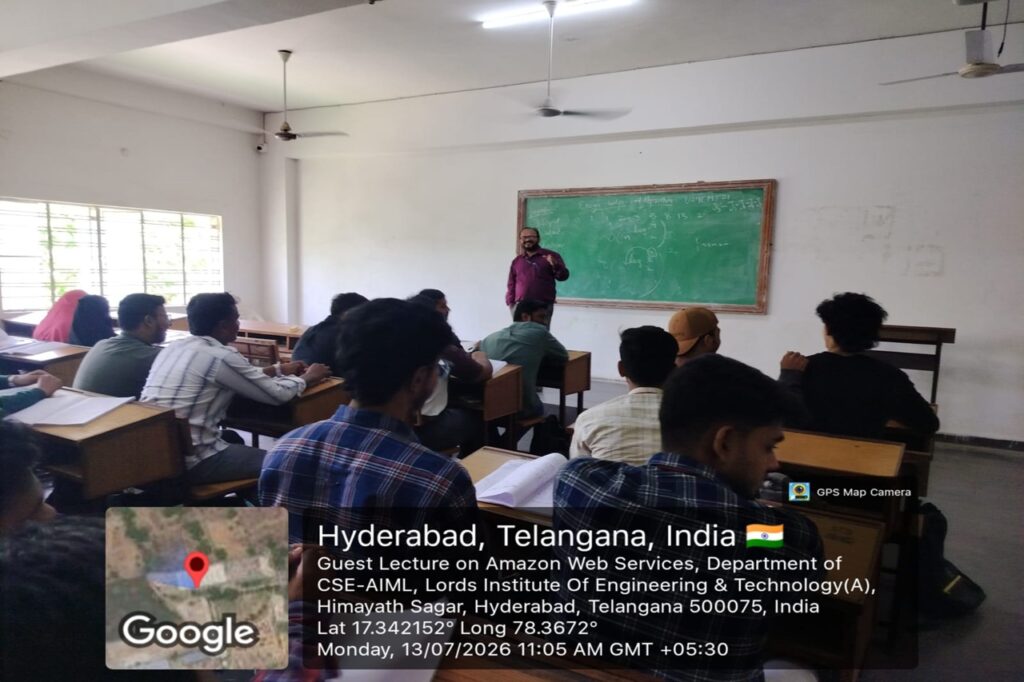
Guidelines for Geotagged Photos:(For External Activities)
-
1. Title/Name of the Event or Activity (E.g Industrial Visit to IBM)
- Date and Time of Capture
- Latitude & Longitude (GPS Coordinates)
- Address/Location
- At least one (1) standard (Normal) photograph in landscape (horizontal) orientation with a resolution of 1280 × 853 pixels shall be submitted for publication on the institution’s website and Instagram as per guidelines of Website Policy-IV, Clause No.1
- Submission of one (1) geotagged photograph is optional but encouraged, wherever feasible.
- At least one (1) standard (Normal) photograph in Portrait mode (Vertical) orientation with a resolution of 900 × 1200 pixels shall be submitted for publication on the institution’s website and Instagram as per guidelines of Website Policy-IV, Clause No.1
- Submission of one (1) geotagged photograph is optional but encouraged, wherever feasible.
2. Department Name and Institution Name
3. Geotag Stamp on Image